




How To Opt Out Of TruthFinder

People Search
Most people don’t realize how much of their personal information is already available online. Even if you are careful about what you share on social media or avoid posting personal details publicly, your information may still appear on data broker websites like TruthFinder.
Just $5. Lifetime Validity

TruthFinder is part of a large industry known as data collection. These platforms collect information from public records, commercial databases, and third-party sources, then organize it into detailed profiles that anyone can access. The information may come from property records, voter registrations, business filings, court documents, and many other legal sources.
What people find can be surprising, and profiles may show past addresses, relatives, phone numbers, and other personal details that were never intentionally shared online. This level of exposure makes it easier for strangers, marketers, or scammers to gather information quickly.
When personal details are organized and searchable, the chances of misuse increase. Common risks include identity theft, targeted scams, unwanted contact, harassment, and loss of privacy. Even outdated or partially incorrect information can create problems if someone relies on it.
This is why opting out of data broker websites has become an important step in online privacy management. Removing your information from TruthFinder helps reduce unnecessary exposure and limits how easily your personal details can be found.
The purpose of this guide is to explain how TruthFinder works, what information it collects, and how you can remove your data responsibly.
What Information TruthFinder Shows About You:
A TruthFinder profile can contain much more information than most people expect. The platform collects data from multiple sources and combines it into a single report, creating a detailed overview of an individual’s background and history.
One of the most common pieces of information shown is basic personal identity data. This may include your full name, possible name variations, age range, and known aliases. Even small variations, such as middle initials or past name formats, may appear as part of the profile.
TruthFinder often displays both current and past addresses, sometimes going back many years. This information may come from property records, utility registrations, or other public filings. When viewed together, address history can reveal patterns about where a person has lived, moved, or worked. Profiles may show possible phone numbers or email addresses linked to your name. Even if the information is outdated, it can still be used by telemarketers, scammers, or data resellers.
One of the more sensitive areas of a TruthFinder report is the relatives and associates section. This part may list family members, roommates, or other people connected through shared addresses or records. While this information may be publicly available elsewhere, presenting it together makes it easier to map personal relationships.
Depending on the available data, this can include property ownership details, court records, business registrations, or other legal filings. Not every profile contains all of these elements, but the possibility increases the level of concern for many users.
Understanding what appears in a TruthFinder profile helps explain why many users choose to opt out. The goal of removal is not to erase public records, but to reduce how easily this information can be accessed and used.
Why You Should Remove Your Data From TruthFinder:
There are several important reasons why individuals choose to remove their information from TruthFinder. While the platform operates within legal boundaries, the public availability of detailed personal data creates risks that many people prefer to minimize.
When personal details such as name, history, address records, and contact information are easily accessible, scammers can use this data to impersonate individuals or answer security questions. Even partial information can help criminals build convincing fraud attempts.
Another major risk is targeted scams. Modern scams often rely on social engineering, where attackers use personal details to gain trust. If someone can see your past locations, relatives, or contact information, they may use that knowledge to make messages or calls appear legitimate.
Public address history can expose where someone currently lives or has lived in the past. For individuals who value privacy or those concerned about harassment or stalking, reducing this visibility is a practical safety step.
Many people are uncomfortable knowing that strangers, employers, neighbors, or unknown visitors can access detailed personal profiles without permission. Opting out helps restore some control over how widely personal information is displayed.
There are also professional considerations. Background searches are commonly used in hiring, tenant screening, and business decisions. If outdated or incorrect information appears in a profile, it may create misunderstandings or negative impressions.
Removing your data also helps reduce spam and unwanted contact. Data brokers and marketers often rely on aggregated information to target individuals. Limiting visibility can lower the chances of receiving unsolicited calls, emails, or messages.
In today’s environment, personal information is treated as a resource that companies collect, organize, and share. Taking steps to remove your data is a proactive way to reduce risk, improve privacy, and limit how easily your personal details can be accessed by unknown parties.
How To Opt Out Of TruthFinder?
Removing your information manually from TruthFinder is possible if you follow the correct steps carefully. Below is a simple step-by-step guide to help you complete the manual opt-out process safely.
Step 1: Open the TruthFinder Opt Out Page
First, go to the official Privacy Center page. This page is the main location where TruthFinder provides tools for users to manage their personal data. Opening the Privacy Center directly saves time and ensures you are using the correct and official opt-out system instead of searching through multiple pages.
Step 2: Go to Public Data Tools

On the Privacy Center page, scroll until you find the section labeled Public Data Tools. Click on ‘View Public Data Tools‘ to expand the available options. This section contains the controls that allow users to manage how their personal information appears within TruthFinder’s database.
Step 3: Select “Manage My Suppression Rules”

Inside the Public Data Tools section, click on Manage My Suppression Rules. This option will redirect you to the suppression system, where the actual removal process begins.
Step 4: Enter Your Email Address
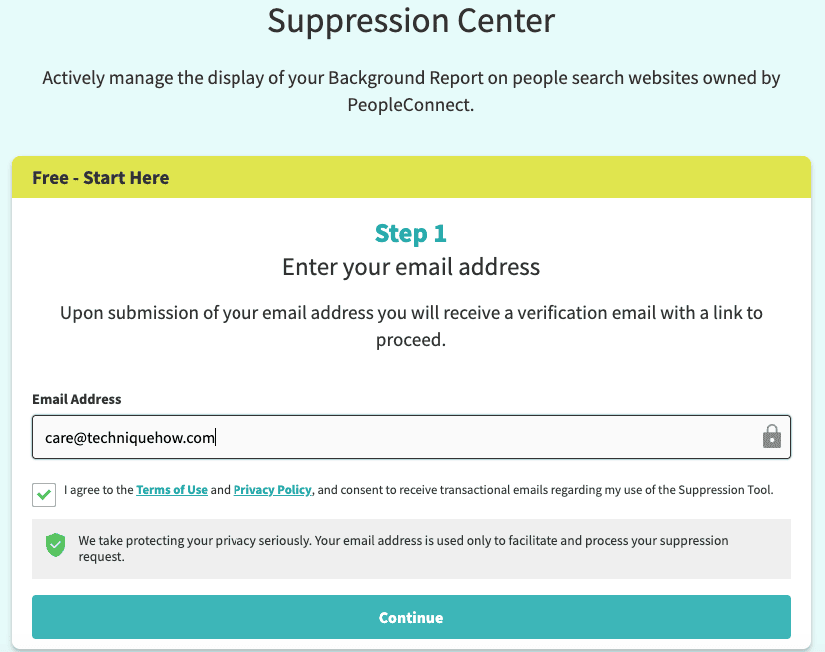
You will be asked to provide an active email address. Enter an email that you can access immediately because the system will send a verification message. You must also agree to the terms and privacy notice before continuing.
Step 5: Verify Your Email

After submitting your email, check your inbox for a verification message. If you do not see it, check your spam or promotions folder. Open the email and click the verification link provided. This confirms that you are the person making the request and allows you to move forward with the suppression process.
Step 6: Enter Your Date of Birth

Once your email is verified, the system may ask for additional information, such as your date of birth. This helps the platform match your identity with the correct records. Enter the information accurately and complete any verification checks shown on the screen before continuing to the next step.
Step 7: Provide Your Full Legal Name

You will then be asked to enter your full legal name, including first, middle, and last name. If you have used other names in the past, such as a maiden name or alternate spelling, you may have the option to add them. Providing complete information improves the chances of finding all matching records.
Step 8: Review Matching Records

After entering your details, the system will display a list of profiles that match your information. Carefully review each result and select the one that belongs to you. Make sure the location, age range, or related details match before choosing. Selecting the wrong profile may delay the process or leave your own record visible.
Step 9: Complete Identity Verification (If Required)

In some cases, the platform may require additional verification using a phone number or email code. Follow the instructions provided and enter the verification code when prompted. This step does not happen for every user, but if requested, it must be completed before the suppression request can be finalized.
Step 10: Select Suppression and Save

For the final step, choose the option that sets the record status to “Suppressed” or hidden. After selecting this setting, click the Save or Confirm button. Once completed, your information should no longer appear in search results. Processing time may vary, so check the site again after a few days to confirm removal.
Why Your Information May Come Back:
Many people feel confused or frustrated when their information appears again after they have completed the opt-out process. In most cases, this does not mean the removal failed. It happens because data broker platforms operate using automated data collection and regular database updates.
One of the main reasons information returns is database refresh cycles. Data brokers constantly update their systems by collecting new public records. If a new record appears that matches your name, address, or other details, the system may automatically generate a new profile.
Public records change more often than people realize. Address updates, property records, business filings, voter registrations, and other official data sources are refreshed regularly. When these updates are collected, the system treats them as new information and may rebuild a profile even if a previous one was suppressed.
Another reason data reappears is third-party data sharing. Many data brokers purchase or exchange information with other companies. If your information is added to a partner database, it can flow back into the system during the next update cycle.
Name variations also create problems. If your name appears with a middle initial, shortened version, or alternate spelling, the platform may treat it as a separate person. This can lead to duplicate or new listings that were not included in your original removal request.
The key point to understand is that data brokers track information, not individuals. When new data appears, the system creates a new record based on available details. This is why removal should be seen as exposure control rather than permanent deletion.
Because of this, ongoing monitoring is important. Checking your name periodically helps you detect new listings early and submit removal requests again if necessary.
Data Removal Service: TechniqueHow Data Removal
For people who want a more complete solution, data removal services offer an alternative to manual opt-out. These services are designed to handle the process across multiple data broker platforms and reduce the time and effort required from the user.
A data removal service collects basic information from the user, such as name, location, and known variations. This information is used to search for matching profiles across different data broker websites.
Once matching records are identified, the service submits removal or suppression requests using the official opt-out procedures provided by each platform. This ensures that requests follow the correct process and meet the platform’s requirements.
Data removal services are especially helpful for people with common names, multiple addresses, or a long history of public records. These situations often create multiple listings that are difficult to manage manually.
Data Monitoring
Information Cleanup Service
Reduce searchable personal details online by identifying exposed records and managing removal across multiple public data sources.
Start Removal
When choosing a service, users should look for transparency, clear procedures, and compliance with platform rules. Legitimate services work only with user permission and submit accurate, honest requests.
Services like those provided by TechniqueHow focus on structured removal, proper matching, and ongoing monitoring. The approach is designed to reduce repeated exposure while maintaining realistic expectations about how data broker systems operate.
Legal Grounds for TruthFinder Opt-Out:
Requesting removal from a data broker website is a legal and valid action. Platforms like TruthFinder provide opt-out tools because users have the right to limit how their personal information is displayed or shared.
One of the main legal concepts behind data removal is consumer privacy rights. In many regions, privacy laws allow individuals to request that companies stop selling or distributing their personal information. These rights apply especially when personal data is used for commercial purposes such as advertising, lead generation, or paid reports.
In the United States, privacy frameworks such as the California Consumer Privacy Act (CCPA) and similar regulations support the idea that individuals should have control over how their personal data is used. Even when these laws do not directly apply to every user, many companies follow similar standards across their platforms.
Legitimate removal services operate within these legal boundaries. Requests must be truthful, authorized by the individual, and submitted through official channels. Any service that promises complete disappearance from all public records should be approached with caution.
This section is provided for general information only and should not be considered legal advice.
How long does TruthFinder Removal Takes?
The time required to remove your information from TruthFinder depends on several factors, including verification steps and system processing time.
The first stage is email verification. After submitting your request, you must confirm your email address by clicking a link. This step usually takes only a few minutes, but the request will not move forward until verification is completed.
Once your identity is confirmed and the correct profile is selected, the suppression request is submitted to the system. In many cases, processing takes a few days, but the exact time may vary depending on the number of records and the current system workload.
During this period, your profile may still appear in search results. This does not mean the request failed. It simply means the update has not yet been applied across the entire database.
After a few days, you should search your name again to confirm that the listing no longer appears. If multiple profiles existed, you may need to repeat the process for each one.
Because data broker databases update regularly, it is also recommended to check your name again after a few weeks or months. New listings may appear if public records change.
Understanding the timeline helps set realistic expectations and prevents unnecessary concern during the removal process.
Common Myths About TruthFinder Removal:
There are many misunderstandings about how data broker removal works. Knowing the facts helps avoid unrealistic expectations.
➡️ Once removed, the data is gone forever: In reality, new listings can appear when public records update or databases refresh.
➡️ Only people with something to hide need removal: Privacy is a normal concern. Many people remove their data simply to reduce risk and unwanted exposure.
➡️ Removing data from one site is enough: Most individuals are listed on multiple data broker platforms. One removal does not reduce overall exposure significantly.
➡️ Data brokers create the information themselves: Most data comes from public or commercial sources. The issue is aggregation and easy access.
➡️ Removal deletes public records: Opt-out requests only remove the listing from the website, not the original public record.
Final Verdict – To Stay Removed
Managing your online privacy has become more important than ever. Platforms like TruthFinder make personal information easy to access, which increases the risk of misuse, scams, unwanted contact, and loss of privacy.
The good news is that the manual opt-out process allows you to remove your information and reduce immediate exposure. For simple cases with one profile, this method can be effective.
However, it is important to understand the limitations. Data broker systems update regularly, and new listings can appear over time. Removal is not permanent, and managing your online presence requires ongoing attention.
Privacy today is not a one-time action. It is a long-term process of awareness, monitoring, and responsible management. By understanding how data broker systems work and taking the right steps, you can significantly reduce your digital footprint and regain better control over your personal information.
Frequently Asked Questions:
Before submitting a removal request, you should first search your full name on TruthFinder to locate your profile. Use your city or state to narrow the results if multiple matches appear. Review each listing carefully and look for details such as age range, past addresses, or relatives that match your information.
Yes, but you must remove each profile separately. TruthFinder treats every listing as an individual record, even if they all belong to the same person. If you have lived at multiple addresses or your name appears in different formats, several profiles may exist. You will need to repeat the suppression process for each one to fully reduce your visible exposure on the platform.
No, opting out of TruthFinder only removes your information from that specific platform. Your personal data may still appear on other data brokers or people search websites that collect similar public records. To reduce overall exposure, you may need to repeat the removal process on multiple platforms or use a structured data removal approach that covers several sites.