

Finding an IP address using a phone number is a matter that many people search for when they receive unknown calls, VoIP scam calls, or suspicious messages. While a phone number does not directly reveal an exact IP address, it can help you collect useful network and location-related clues when combined with the right tools and methods.
Today, most calls (especially spam and scam calls) use VoIP services, and these calls travel through internet servers instead of traditional mobile networks. As a result, digital footprints, such as ISP type, server region, and IP ranges, can sometimes be identified indirectly.
In this guide, you’ll learn how lookup tools, IP loggers, manual searches, and network commands work together to provide a clearer picture of where a call may be coming from. These methods are commonly used by cybersecurity researchers, digital marketers, and fraud investigators to analyze unknown callers.
To make this easier, you can try the TechniqueHow’s caller number tracker tool. With this tool, you simply enter a phone number and instantly get:
- Approximate location (country, region, city level)
- Server or ISP information linked to the number
- Multiple IP blocks shown as examples only (CIDR format)
- Network type insights (mobile data, VoIP server, broadband, etc.)
If you’re dealing with spam, scams, or just curious about how phone numbers connect to internet networks, this guide will help you understand the process clearly.
TechniqueHow’s Caller Number Tracker
⚠️ This tool uses publicly available telecom and network information for educational purposes only and does not reveal real-time locations or personal identities.
TechniqueHow’s Caller Number Tracker Tool is a smart, easy-to-use tool designed to help users understand basic network and location insights linked to a phone number. Whether you are verifying an unknown caller, analyzing traffic sources, or exploring telecom-related data for educational or research purposes, this tool provides fast and structured results without complexity.
By simply entering a phone number and selecting the appropriate country code, the tool analyzes publicly available telecom validation data and renders a location, such as the country and region level. Based on this detected location, it then retrieves representative network information, including common ISPs, network types, and example IP address blocks.
With a clean interface, this tool is ideal for researchers, developers, and tech enthusiasts who want quick insights into how phone numbers relate to telecom infrastructure worldwide.

➡️ How It Works:
Step 1: Enter the phone number and choose the correct country code from the dropdown menu.
Step 2: Click on ‘Track‘ and the tool will validate the number and detect its approximate country and regional location.
Step 3: Based on location, network providers, and example IP blocks are generated automatically.
Step 4: The results display ISP, network type, and CIDR-based IP block examples instantly.
What is an IP Address?
An IP address is a network identity given to a device when it connects to the Internet or any local network. It works like a routing label, helping data know exactly where to go and where it came from. Every online action, i.e. opening a webpage, sending a message, or using an app, depends on this address to function properly.
If a device had no IP address, it would be invisible online. Websites wouldn’t know how to respond, apps wouldn’t load, and online services wouldn’t be able to communicate with it.
Modern smartphones usually operate with two IP addresses at once:
Local (Private) IP – Assigned inside your Wi-Fi or internal network. It is used only between devices on the same network and never appears publicly.
External (Public) IP – Assigned by your internet provider. This is the address seen by websites, servers, and online platforms.
The public IP may change frequently, especially on mobile networks, while the private IP remains stable during a network session.

Here are two main formats:
- IPv4 → short numeric format (e.g., 192.168.1.1).
- IPv6 → longer alphanumeric format, designed to replace IPv4.
Every smartphone usually has:
- Private IP → works inside your Wi-Fi or local network.
- Public IP → visible to websites, apps, and online services.
How to Find IP Address By Phone Number?
Many people mix up IP addresses, phone numbers, and emails, thinking they all reveal the same information. In reality, they work very differently. A phone number does not directly expose an IP address, but it can help you find digital clues that point toward network location, ISP type, or VoIP usage.
In this guide, you’ll learn practical, step-by-step methods to gather those clues using VoIP lookup services, IP logging tools, manual online searches, and basic system commands.
1. Call Number Tracker App
Many spam and scam calls today use VoIP (Voice over Internet Protocol) instead of traditional mobile networks. VoIP numbers often leave traces across public databases, people-search platforms, and caller directories.
By checking these sources, you can learn whether a number is linked to online activity, virtual phone services, or known spam behavior.
A. Whitepages
Whitepages is a widely used online directory that helps identify details connected to phone numbers, including carrier type, general location, and spam reputation. While it does not directly reveal an IP address, it plays an important role in understanding whether a phone number is linked to VoIP services, virtual numbers, or traditional telecom networks. This distinction matters because VoIP numbers are internet-based and often associated with servers, ISPs, and rotating IP ranges rather than a fixed physical location.

When dealing with unknown or suspicious calls, Whitepages helps you quickly decide whether a number looks legitimate, recycled, or potentially risky, which is a strong starting point before moving to deeper IP-related analysis.
Here’s how to use it effectively:
Step 1: Visit the official Whitepages website using any browser on desktop or mobile.
Step 2: Enter the full phone number (including country code, if applicable) into the search bar and start the lookup.
Step 3: Review the summary details shown on the results page. This may include:
- Carrier type (mobile, landline, or VoIP)
- General location (city or region level)
- Spam or fraud risk indicators
- Whether the number is frequently reported by users
Step 4: Just look at the labels such as “VoIP number”, “non-fixed line”, or “high spam risk”. These labels strongly suggest the number uses internet-based calling systems.
If available, check related information such as associated names, past locations, or business tags. These details can be cross-checked with social media or manual Google searches.
B. Spokeo (Reverse Lookup)
Spokeo gathers data from public records, online profiles, and digital directories. While it does not show an IP address, it helps you build context around a phone number.
Step 1: Visit Spokeo’s official website using a browser, sign up, and select the phone number search option to start.
Step 2: Now, type the phone number into the search field, then press Enter to initiate the lookup automatically.
Step 3: Spokeo displays available details, including name, linked addresses, social media, and sometimes even photos for context.
Step 4: Check the available addresses and email connections to strengthen leads related to that person’s digital presence online.
You can save results and cross-check them with social searches or other lookup platforms for confirmation or added details.
Remember: Spokeo is a paid service, so full details may require purchasing a report subscription plan for access.
2. Online Log Tool: Grabify
Another indirect way to find someone’s IP address is by using an IP logging service like Grabify.
This tool allows you to create a custom tracking link that records the IP address of anyone who clicks it. The beauty of this method is that it doesn’t require advanced technical skills. Let’s start.
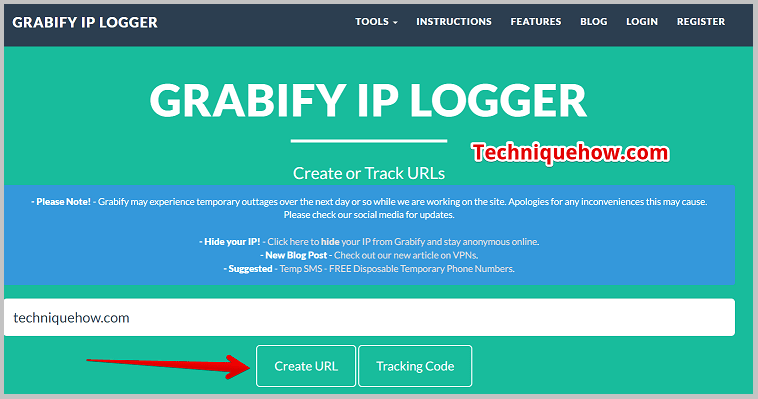
Step 1: First, open the Grabify IP Logger website and find an article or video and copy its link, which is catchy enough to interest any user to open it.
Step 2: You’ll need to paste the copied link into the white input box and click on Create URL, and proceed.
Step 3: You’ll be taken to the next page, where you’ll be able to find the shortened link as New URL. Copy that link.
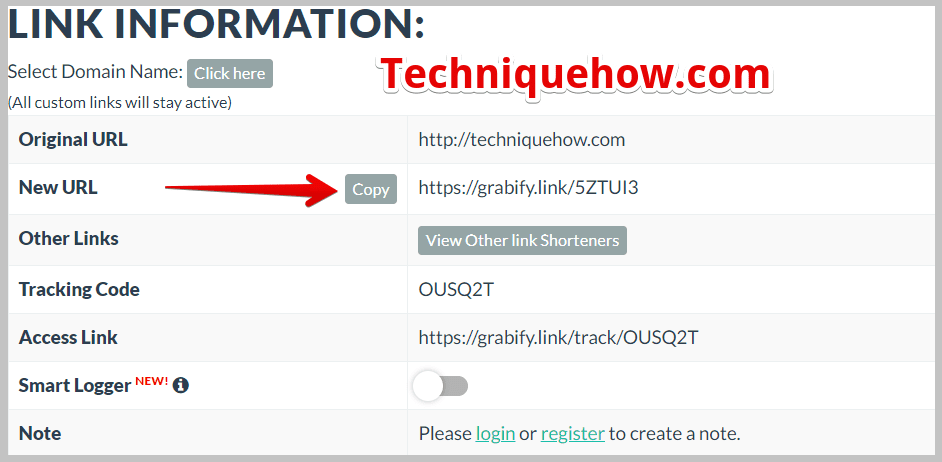
Step 4: You’ll also see the tracking code that you need to remember so that you can use it later and send the copied link via SMS to the person whose IP you want to trace.
Step 5: Wait for the user to click to open the link, and as soon as the user opens the link, Grabify records its IP address and directs back to the original topic of the link.
Step 6: Next, head on to Grabify’s homepage, enter the tracking code in the white input box, and click on Tracking Code/Access Link.
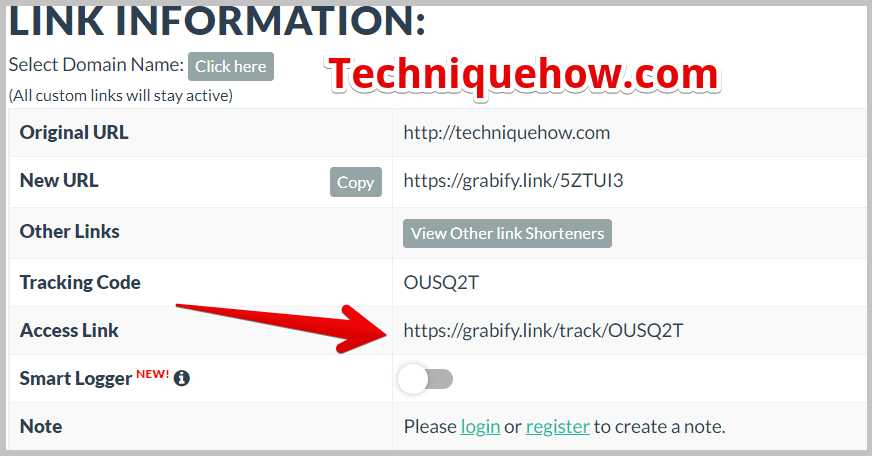
From the access link, scroll down to see the Results. It will display the number of users that have clicked on the link as well as their other details like IP address, date and time, country, user agent, etc.
You can also enter the IP address into the TechniqueHow’s IP lookup tool and see more accurate details, including ISP and more.
3. Try Manual Search (Social Media or Google)
Manual searching can be powerful because people leave digital traces online, and that is why Google search, social media platforms, and reverse image lookup are common tools to start with.
This approach doesn’t directly reveal IP addresses but helps gather leads that may eventually point to IP-based details.
Many investigators start with simple Google searches before moving to technical tracing.
Step 1: Enter the person’s email address directly into the Google search bar and check the results for possible connections.
Step 2: Now, try usernames used by the person across platforms; check if accounts are linked under the same name.
Step 3: Here, upload their profile picture to Google Images or TinEye for the reverse image search identification process.
You can also check on the social media platforms like Facebook, Instagram, or Twitter for activity linked to searched details.
Now, cross-check email, username, and images to create connections between accounts belonging to the same person online.
Secure Checks
Tracing Made Simple
We scan for scam history, origin, negative reports, and misuse patterns. Full report delivered in 7 days!
Get Report
How To Hide Your IP Address?
Many people believe their internet activity is private, but the truth is, every time you visit a website or connect online, your IP address is recorded. This address reveals your location, internet provider, and sometimes more. That can feel scary if you’re concerned about privacy or want to browse securely.
1. Using Tor Browser
The Tor Browser is a free tool designed to keep your browsing anonymous. It works by routing your traffic through multiple servers, also called nodes, around the world.
Tor is often used by journalists, activists, and individuals who value privacy. While it provides strong anonymity, it can be slower compared to normal browsers because of the multiple layers of encryption. If your main goal is to hide your IP and browse privately,
2. Try VPN
A VPN is one of the most common and effective ways to hide your IP address. It works by creating a secure tunnel between your device and a VPN server. When you connect, your real IP address is masked and replaced with the server’s IP, which could be in another country.
VPNs also encrypt your data, protecting it from hackers, trackers, and even internet providers. They are widely available as apps on mobile, desktop, and browsers.
3. Proxy Server
A Proxy Server acts as an intermediary between your device and the internet. When you browse through a proxy, your requests go to the proxy server first, and then the proxy connects to websites on your behalf.
This way, websites only see the proxy’s IP address, not your real one. Proxies are often used for bypassing region restrictions, hiding identity, or accessing blocked sites. However, unlike VPNs, most proxies do not encrypt your data, so they’re less secure.
Still, for quick and simple anonymity, a proxy server can effectively mask your IP address when needed.
On social platforms, IP data helps find fake accounts, cyberbullying, or scams. Combined with usernames, emails, or activity patterns, it gives a clearer picture of who is behind an account. By combining IP addresses with social data, investigators can connect accounts, find hidden links, etc.
Frequently Asked Questions:
An IP address doesn’t reveal your exact home address. At most, it shows your approximate city, state, or region. Internet service providers assign IPs, and only they can match an IP to a specific customer record.
If someone has your IP address, they could perform actions like checking your general location, blocking your access to services, or even launching Distributed Denial of Service (DDoS) attacks. In some cases, hackers might use your IP to attempt, but strong firewalls and updated devices minimize risk.
Using that IP address to stalk, harass, commit fraud, or launch cyberattacks crosses into illegal territory. Laws like GDPR in Europe and the CFAA in the U.S. regulate how IP data can be used. So, while a simple lookup isn’t a crime, misuse can lead to serious legal consequences.
Hello, if the user is not clicking on the Link still will I be able to find the location?
Hello, Robert, when the user clicks on the link then only you will see who just clicked on it and from where. Else, you would not. You can still try the other methods mentioned in this article.
Hi, I wanted to track my friend’s exact location. But the location shows country and generic details. Can it be more precise?
Hey, Derrick! As I understand you want to track the real time data of your friend. But this system will allow you to track the IP address and shows location based on it.
Hello, I see many IP addresses on the access link. But could not identify which one is of that person.
Hi Teresa, you will see multiple IP addresses on Grabify records if you have sent the link to multiple users. If you want to track only a particular user then send one link to one user only.